Karrot App English Guide: How Foreigners Buy & Sell Used Items in Korea (2026)
Setting up life in Korea from scratch is expensive — furniture, appliances, and daily essentials add up fast. The Karrot App (당근마켓, Danggeun Market) is Korea's most active secondhand marketplace, trusted by over 32 million users, and its Karrot App English version gives expats a safe, affordable way to buy used items in Korea or recover costs before departure. The first time someone tries to buy a microwave off Karrot in Itaewon without knowing a word of Korean — copying text into Papago, trying to confirm a subway exit for pickup — the platform can feel overwhelming. But once the mechanics click, it becomes one of the most genuinely useful apps for daily life in Korea. This guide covers everything beginners need: neighborhood verification, safe buying habits, Yongdal delivery logistics, and listing strategies that drive same-day sales.
Key Takeaways
- The Karrot App English version is available on iOS and Android — change language via My Karrot → App Settings → 기타 → Language Settings before browsing any listings.
- Neighborhood verification (동네 인증) is mandatory and must be renewed approximately every 30 days — without it, messages to sellers will fail.
- Transactions are almost always face-to-face at public locations; always confirm meetup spot, time, and payment method — and budget ₩20,000–₩60,000 for Yongdal delivery if picking up large furniture in Itaewon, Hongdae, or Gangnam.
- Selling fast on Karrot comes down to three things: a specific keyword-rich title, an honest condition description, and a competitively researched price.
Karrot App English Setup and Neighborhood Verification
The most common question from new arrivals is simple: does Karrot work in English? Yes — the Karrot App English version is available on both the App Store and Google Play. Download it at karrotmarket.com, then follow this exact path to change the language:
| Step | Tap This | What to Look For |
|---|---|---|
| 01 | Bottom-right icon (person silhouette) | Opens My Karrot (나의 당근) |
| 02 | App Settings (앱 설정) — bottom of screen | Scroll down to find it if not immediately visible |
| 03 | Section labeled 기타 (Other) | Language Settings (언어 설정) is here |
| 04 | Select English variant | American / British / Canadian English all available |
| 05 | Tap 확인 (Confirm) — NOT 취소 (Cancel) | App restarts in English immediately |
Even after switching to English, most item descriptions remain in Korean because the overwhelming majority of sellers are locals. This is completely expected. The practical solution used by most foreigners on Karrot is to copy listing text directly into Papago (Naver's translation app, optimized for Korean) or Google Translate. Papago tends to handle conversational Korean and shorthand — common in Karrot listings — more accurately than Google Translate for this specific use case.
Real Experience: Many first-time Karrot users in Itaewon and Mapo report that sellers respond well when the opening message includes a short disclaimer — something like "My Korean isn't great, but I'm using Google Translate!" Listing descriptions in both English and Korean (using Papago to translate your own text) attracts significantly more buyers, including other foreigners who actively search for English-language posts in expat-heavy districts.
What Is Neighborhood Verification — and Why Is It Mandatory?
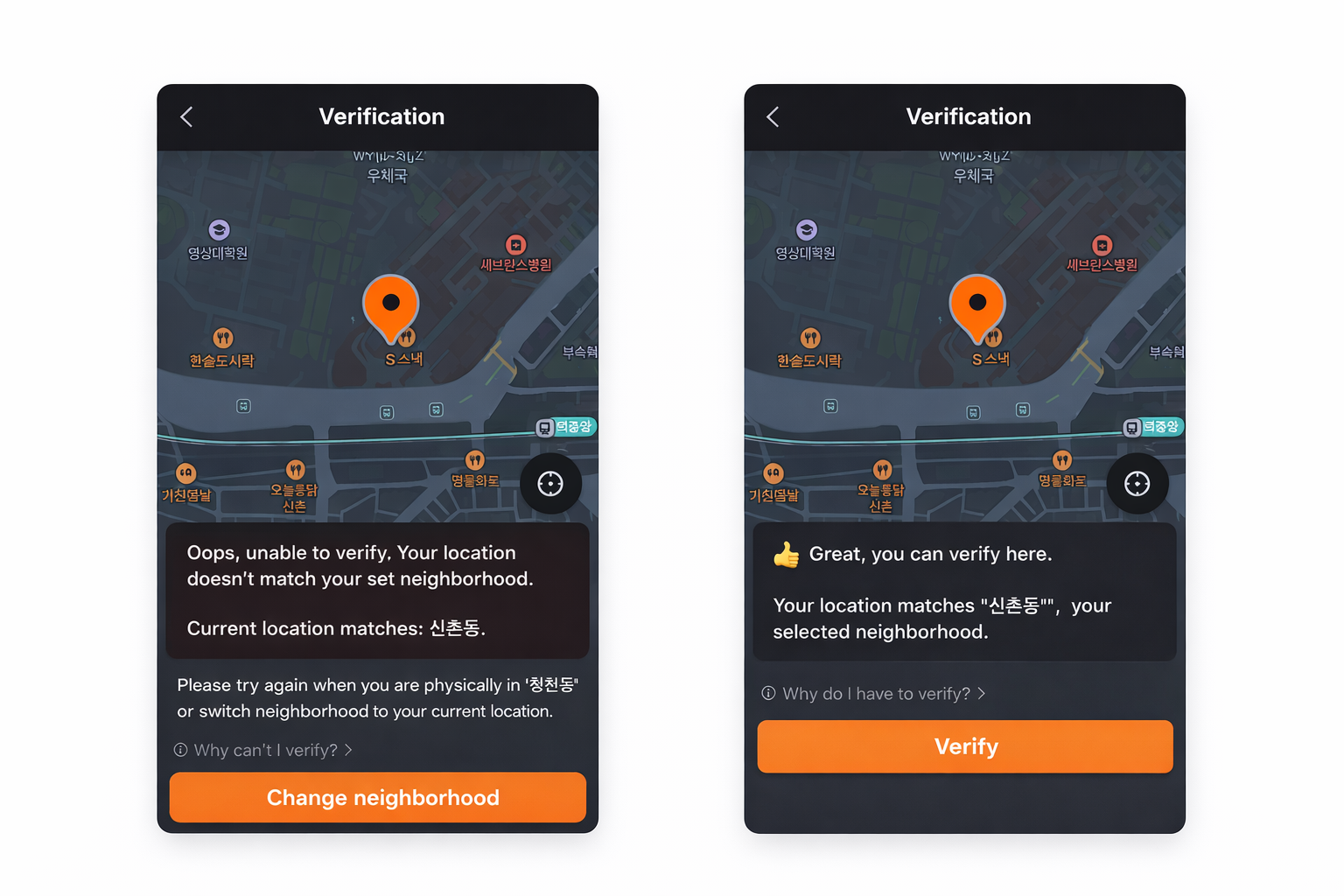
Karrot is built around a hyperlocal trust system. Unlike global platforms where anyone can buy and sell nationally, Karrot requires every user to verify their neighborhood (동네 인증) — the smallest district unit (동, dong) in Korea — before browsing listings. This is not optional. It is the core mechanism that keeps the platform fraud-resistant and community-based. Verification must be renewed approximately every 30 days; the app will prompt a reminder when the window expires.
| Step | Action Required | What Happens |
|---|---|---|
| 01 | Enable location services on your device | GPS detects your current dong automatically |
| 02 | My Karrot → My Neighborhood (내 동네 설정) | Detected local area is displayed |
| 03 | Tap the location icon (bottom-right of map) | GPS confirmation activates |
| 04 | Tap Done / Confirm | Verification granted — a small badge confirms success |
| 05 | Adjust browsing radius (nearby / wider) | Wider radius shows listings from adjacent dongs |
Do not skip re-verification: If the verified address does not match the seller's area, messages will fail silently or be ignored. When moving to a new apartment in a different district — whether from Itaewon to Hongdae, Sinchon to Mapo, or anywhere else — update the neighborhood immediately. Re-verification takes under one minute and is free. Verification failure is the single most common reason foreigners report that Karrot "doesn't work."
Insider Tip: Karrot allows up to two neighborhoods to be registered simultaneously — navigate to My Neighborhood → + (plus button) to add a second area. Setting one near home and one near a workplace dramatically expands available listings. In expat-dense zones like Itaewon, Hongdae, Gangnam, and Sinchon, this dual-neighborhood strategy is standard practice among long-term residents. It is a built-in feature, not a workaround.
How to Buy Used Items in Korea Safely
Karrot is generally considered safe — seller profiles display response rates, transaction counts, and community trust scores, all visible before sending a single message. However, buying secondhand in Korea follows distinct cultural norms that differ from Western platforms. Understanding these norms prevents failed deals, awkward silences at meetups, and wasted journeys.
Step 1 — Keep the First Message Short and Respectful
Korean sellers on Karrot prefer brief, direct messages. A long introductory paragraph is unusual and can slow down responses. The most effective opening messages use a simple format:
- "Is this still available?" — the most common opening line on the platform
- "Can I pick it up today or tomorrow?"
- "Would you take [lower price]?" — only after the seller confirms the item is available
Step 2 — Confirm All Pickup Details Before Leaving Home
The vast majority of Karrot transactions are face-to-face exchanges at public locations. Common meetup spots include subway station exits, convenience store entrances (GS25, CU, 7-Eleven), and apartment building lobbies. In expat-heavy areas of Seoul — Itaewon, Hongdae, Mapo, Gangnam, and Sinchon — secondhand furniture and electronics listings move especially quickly, so confirming details the same day as messaging is important.
| What to Confirm | Why It Matters | Standard Expectation |
|---|---|---|
| Exact meetup location | Vague descriptions lead to missed connections | Specific subway exit number or store name |
| Agreed time | Punctuality matters in Korean social culture | Running 5+ minutes late requires a text in advance |
| Payment method | Avoids confusion at handover | Cash (현금) or mobile transfer — Kakao Pay / Toss |
| Item disassembly | Large furniture often requires prep before transport | Ask seller in advance, not at the pickup point |
Cash is still widely accepted on Karrot — especially for lower-value items. Foreigners who have not set up Korean mobile payment apps (Kakao Pay, Toss) can pay in cash without issue. If setting up a Korean bank account is still on the to-do list, check this step-by-step guide to opening a Korean bank account as a foreigner.
Step 3 — Inspect Everything Before Paying
Unlike major e-commerce platforms, secondhand items on Karrot are sold strictly as-is. There are no return policies, no buyer protection programs, and no refund processes. The responsibility to inspect falls entirely on the buyer at the moment of handover.
For cheap furniture Korea purchases in Gangnam, Itaewon secondhand furniture listings, or Hongdae area appliances, clarify logistics before the meeting:
- Does the building have elevator access for large items?
- Does the furniture need disassembly before transport?
- Is delivery included, or is self-pickup the only option?
Insider Tip — Electronics Check Protocol: When buying any electronics, always ask the seller to power on the device at the meetup point before money changes hands. A seller who refuses to demonstrate a working device is a clear red flag, regardless of their profile rating. Requesting a live demonstration is completely standard — no reasonable seller takes offense. For iPhones and Samsung Galaxy devices in particular, also check Settings → About Device to confirm the IMEI is not blacklisted.
Finished buying but have leftover unwanted appliances? Before spending money on bulky waste stickers (대형 폐기물 스티커), check this guide on free appliance pickup in Korea — large electro


