When I first arrived in Seoul, my Visa card was declined three times while trying to pay through Kakao T. I later discovered that the issue was caused by international online transaction blocking. Only after calling my bank and activating 3D Secure (3DS) authentication was the problem resolved. Kakao T taxi in Korea is the most reliable app for booking a taxi even if you don’t speak Korean. However, many foreigners struggle with foreign credit card registration and switching to English mode. In this guide, I’ve organized the entire process—from app installation to card registration and step-by-step taxi booking—so that even beginners can follow along easily.
How to Download and Set Up Kakao T App (English Mode)
The Kakao T app is developed by Kakao Mobility Corp. and is available worldwide on both iOS and Android. The setup process takes under 5 minutes, and a Korean phone number is not required for basic taxi booking.
Step 1. Download the App
Search "Kakao T" in the App Store or Google Play Store. Always verify the developer name before installing — there are similar-looking apps that are not the official version.
| Device | Store | Developer Name |
|---|---|---|
| iPhone / iPad | Apple App Store | Kakao Mobility Corp. |
| Android | Google Play Store | Kakao Mobility Corp. |
Step 2. Sign Up or Log In
After installation, create an account. There are two options depending on your situation:
- Kakao account — ideal if you already use KakaoTalk
- International phone number — the recommended option for tourists and short-term visitors without a Korean SIM card
A Korean number is not required to use taxi booking. However, having a local SIM makes SMS authentication faster. For SIM card options right from the airport, see: Best Korea SIM Cards & eSIMs for Tourists (2026): Airport Pickup Guide.
Step 3. Switch to English Mode
By default, the app launches in Korean. Many first-time users miss this step entirely — here is exactly how to change the language:
- Tap the menu icon (top-right corner of the home screen)
- Select Settings (설정) — look for the gear-shaped icon
- Tap Language (언어)
- Choose English and confirm
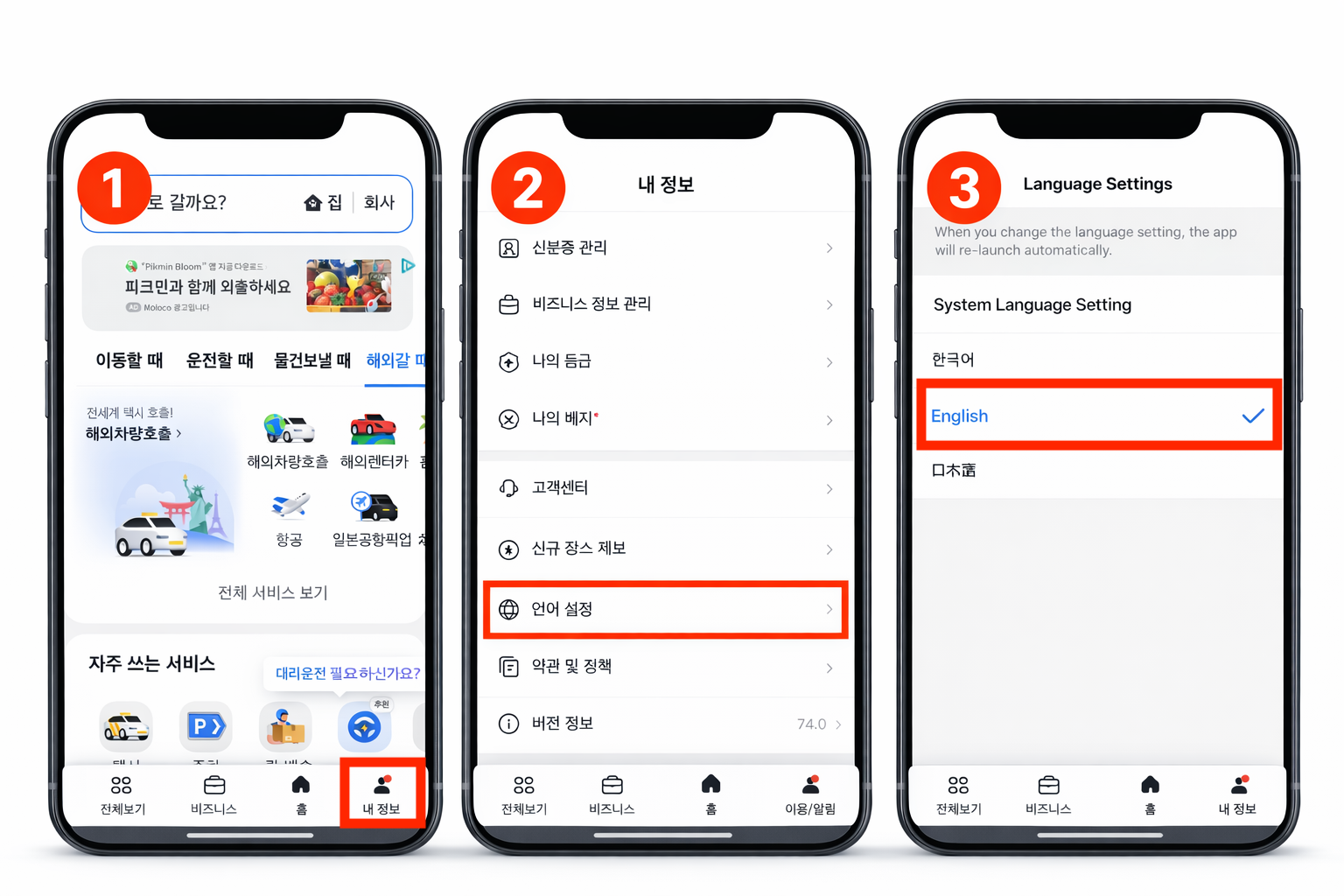
Insider Tip: Even if the full menu appears in Korean, the gear icon position never changes. Tap it, then look for the second item — that is Settings. Switching to English significantly reduces booking errors when entering destinations in Seoul's dense neighborhoods.
How to Register a Foreign Credit Card in Kakao T
Payment failure is the most common frustration foreigners face with Kakao T. In almost every case, the problem is not the app — it is the card's overseas transaction settings. Follow these steps before your first ride.
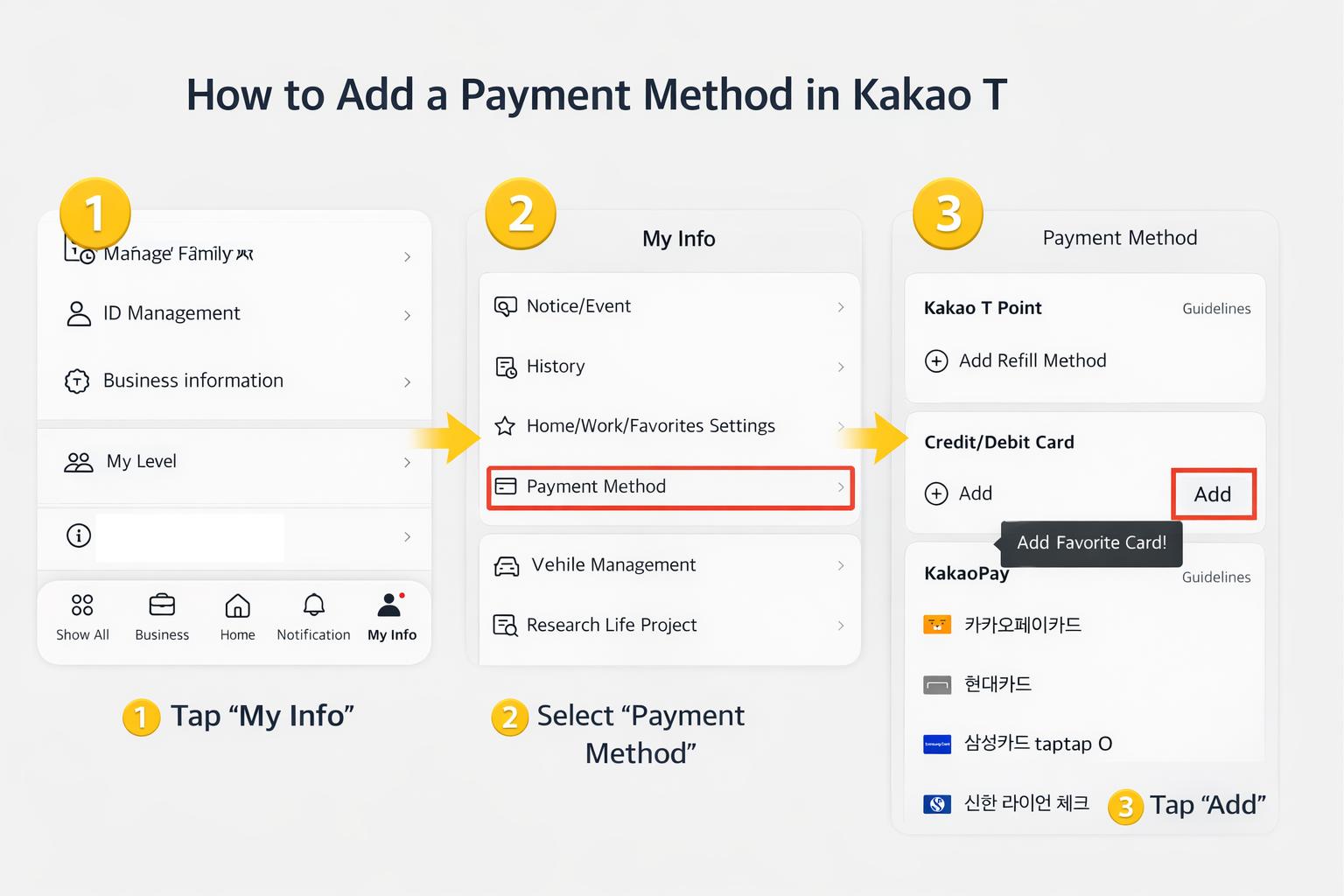
Step 1. Navigate to Payment Settings
- Open the Kakao T app
- Tap My Info (bottom navigation bar)
- Select Payment Methods
- Tap Add Card (+)
Step 2. Enter Your Card Information
Kakao T supports the following international card networks:
- Visa — most widely accepted, recommended
- Mastercard — fully supported
- American Express — limited support (some cards may fail)
Enter all details exactly as printed on your physical card:
- Card number (16 digits, no spaces)
- Expiration date (MM / YY format)
- CVC security code (3-digit code on the back)
- Cardholder name — spelling and spacing must match exactly
Real Experience: When I first tried to register my card, I repeatedly received the error message “Failed to add payment method.” The cause was international online payment blocking. The issue was resolved immediately after I called my card issuer and requested activation of 3D Secure (3DS) authentication.
Before registering your card, make sure that both international online transactions and 3DS authentication are enabled in your banking app or through customer support. If these settings are disabled and your payment is declined when you arrive at your destination, it can create a very uncomfortable situation.
Common Foreign Card Errors & Solutions
| Error | Likely Cause | Solution |
|---|---|---|
| Card Registration Failed | Bank blocks international online transactions | Call your bank and request Korean merchant access to be enabled |
| Payment Declined | 3D Secure authentication not activated | Enable international 3DS via your bank's app or customer service |
| Card Not Supported | Local debit card or unsupported card network | Use a major Visa or Mastercard credit card instead |
| Verification Timeout | Slow OTP / authentication delay | Retry on a stable Wi-Fi connection rather than mobile data |
Insider Tip: If your foreign card still fails after all the above steps, select "Pay to Driver" during booking. Most Korean taxis accept international Visa and Mastercard via the in-vehicle card terminal. For a long-term fix, opening a Korean bank account makes app payments fully seamless — see: 5 Easy Steps to Open a Korean Bank Account (2026).
Step-by-Step Guide to Booking a Taxi with Kakao T
With the app in English and a payment method confirmed, booking a Kakao T taxi in Korea takes under two minutes. The entire process runs through the app — no Korean conversation with the driver is needed at any point.
Step 1. Set Your Pickup Location
The app uses GPS to automatically detect your current position. If the blue pin is slightly off — common inside malls, subway exits, or large hotel lobbies — drag it manually on the map to the correct entrance. Accuracy here prevents the driver from arriving at the wrong side of a building.
Step 2. Enter Your Destination
The destination search bar accepts all of the following formats:
- English place names — e.g., "Incheon Airport Terminal 1", "Myeongdong Station Exit 6"
- Korean addresses — copy and paste directly from Google Maps, Naver Map, or your hotel confirmation email
- Venue or hotel name — type or paste the name to search from the app's database
Insider Tip: KakaoMap and Naver Map significantly outperform Google Maps in Korea for real-time transit and bus routes. Use them alongside Kakao T for a complete navigation setup — full comparison at Which Korean Map App is Best for Foreigners? (2026 Tested).
Step 3. Choose Your Taxi Type
| Taxi Type | Best For | Relative Fare |
|---|---|---|
| General Taxi (일반택시) | Everyday rides, solo or couple travel | Standard (base fare) |
| Deluxe Taxi (모범택시) | Business trips, comfort preference | Higher (~1.5x standard) |
| Venti (대형택시) | Groups of 4–6 people, large luggage | Higher (~2x standard) |
| Kakao T Blue | Professional drivers, premium service | Mid-premium |
For most trips — including airport transfers with one or two standard suitcases — General Taxi is sufficient. Choose Venti for groups or oversized luggage.
Step 4. Select Payment Method
- Registered foreign credit card — charge is processed automatically after the ride; a receipt appears in the app's trip history
- Pay to Driver — pay directly by card (tap/insert) or cash inside the taxi; select this if card registration failed
Step 5. Confirm and Track Your Ride
Tap "Request Taxi." The app matches you with a nearby driver, usually within 30–60 seconds. Once matched, the screen displays:
- Driver name and profile photo
- License plate number — always verify this before entering the vehicle
- Estimated arrival time (ETA) in minutes
- Real-time GPS tracking of the driver's route to your location
During the ride, no communication is needed — the destination is already loaded in the driver's navigation system. The fare calculates automatically based on distance and time.
Night Surcharge Notice: When I booked a taxi through Kakao T after 10 PM, I was surprised to see the fare about 20% higher than expected. The reason was the late-night surcharge (10 PM – 2 AM).
Kakao T shows the estimated fare before you confirm your booking, so it is strongly recommended to check the fare carefully before tapping "Request Taxi".
Conclusion: KimchiLandGuide's Verdict
Once the Kakao T app is set to English and a foreign credit card is registered with 3DS authentication enabled, booking a taxi anywhere in Korea becomes fast, transparent, and completely stress-free — no Korean language skills required. Confirm your card's overseas settings with your bank before arrival for a smooth first ride.
Ready to go further in Korea? Save up to 53% on subway and bus rides with the K-Pass Korea transit card guide, or order food to your hotel with the Top 5 Korea Food Delivery Apps with English Support (2026). Planning to explore Korean fashion or beauty while you're here? Our sister blog TalkMaru has a complete walkthrough on How to Use the Musinsa Global App in English — the easiest way to shop Korean streetwear without the language barrier.


